
Spark On EKS: Enable S3 Magic committer

In this blog, I will describe, how to enable the S3 magic committer on the Spark cluster(Running on AWS Elastic Kubernetes Service).

Prerequisites:

  • EKS Cluster on AWS
  • Spark cluster setup on EKS

First, I will describe the need of s3 magic committer. I will take my use case as an example. Reading data from Postgres tables(meta, data ), joining them, and writing on S3. Here is the code:

Meta table:

val metaTable = s"(select * from analysis_meta where id >= 1220572171319017472 and id < 1620572171319017473) as meta"

val metaDf =
        spark
          .read
          .format("jdbc")
          .option("numPartitions" , "2000")
          .option("lowerBound",  "1220572171319017472")
          .option("upperBound", "1620572171319017473")
          .option("partitionColumn", "id")
          .option("dbtable", metaTable)
          .option("driver" , "org.postgresql.Driver")
          .option("url", "jdbc:postgresql://AWS-RDS-URL.amazonaws.com/analysis_db?user=****&password=****")
          .load()

Spark requires these parameters to partition the data of the table:

  • numPartitions
  • lowerBound
  • upperBound
  • partitionColumn

These parameters are mandatory otherwise spark will read all the data into a single partition.

Data table:

val textTable = s"(select id , text from analysis_data where id >= 1220572171319017472 and id < 1620572171319017473) as data"

val textDf =
      spark
        .read
        .format("jdbc")
        .option("numPartitions", "2000")
        .option("lowerBound", "1220572171319017472")
        .option("upperBound", "1620572171319017473")
        .option("partitionColumn", "id")
        .option("dbtable", textTable)
        .option("driver", "org.postgresql.Driver")
        .option("url", "jdbc:postgresql://AWS-RDS-URL.amazonaws.com/analysis_db?user=****&password=****")
        .load()

Join the meta and data table then write on S3:

val df = metaDf.join(textDf, "id")

      df
        .write
        .partitionBy("lang", "month")  // partition by language and month
        .mode(SaveMode.Append)
        .parquet(s"s3a://bucket-name/analysis-data")

let’s run this job. Both tables have 80M rows(~ 400GB). It will take 1 hour to complete.

DAG:
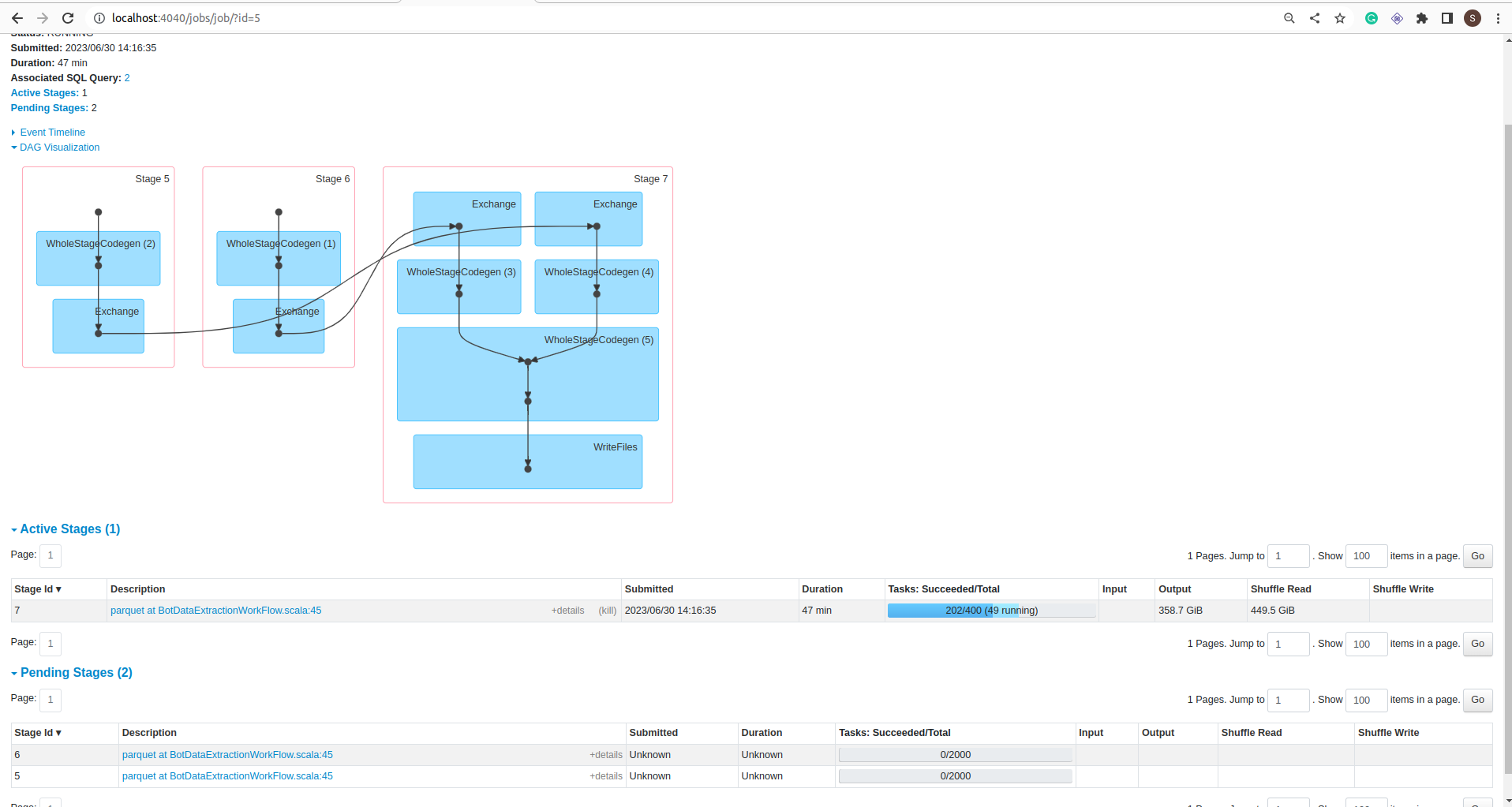
Stage:

Job:
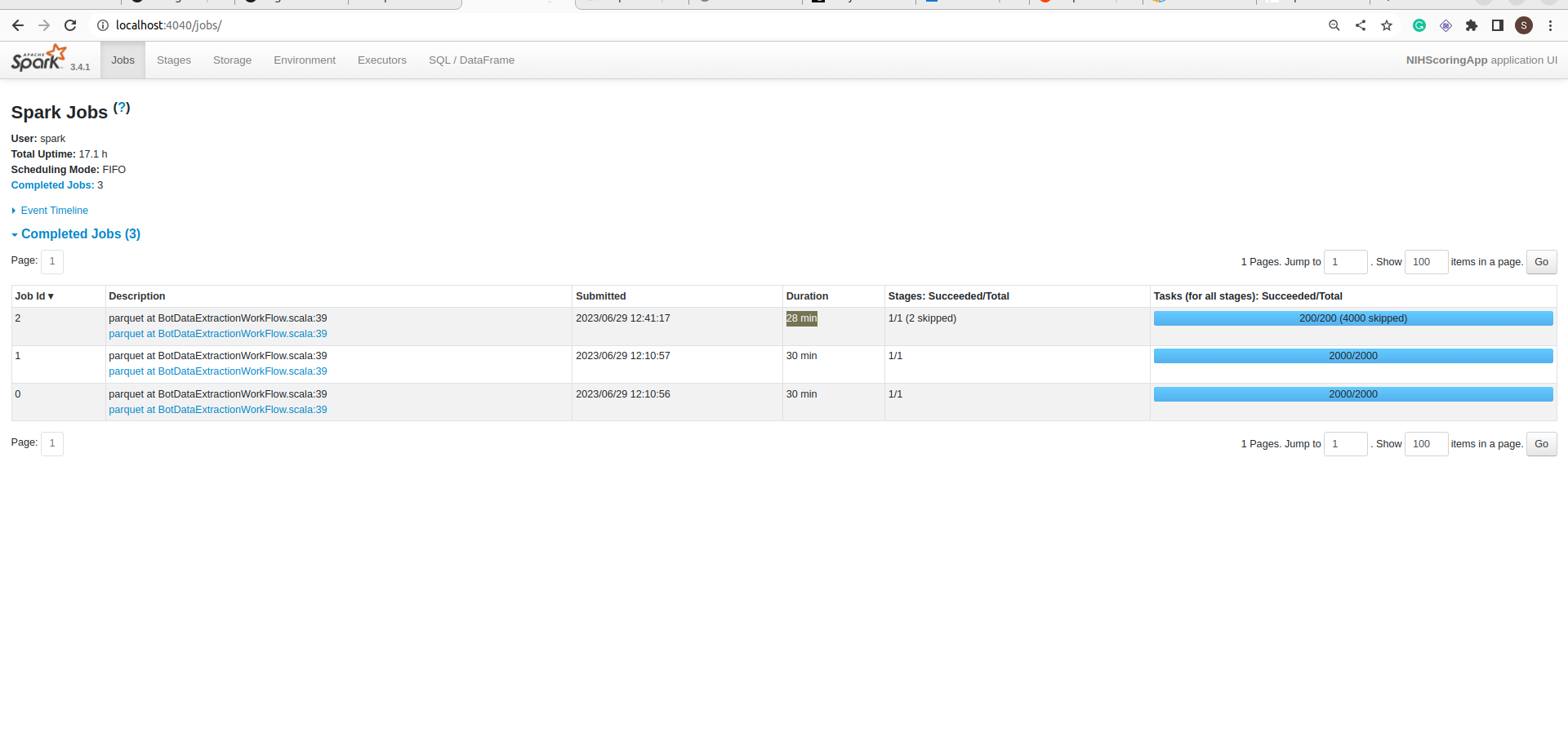
My Spark cluster size is 8 * m5.2xlarge nodes.

If you notice in the jobs details screenshot, the Job took 1 hour to complete but data is not committed into the folder. It is still in _temporary folder.

To commit all the data spark took more than 12 hours.

That was surprising but It is not a Spark problem. Spark is warning about that in the log:

11549:23/06/30 09:26:40 WARN AbstractS3ACommitterFactory: Using standard FileOutputCommitter to commit work. This is slow and potentially unsafe.

Using standard FileOutputCommitter to commit work. This is slow and potentially unsafe.”

Let’s switch to the magic committer. It requires just a configuration change:

spark.hadoop.fs.s3a.bucket.all.committer.magic.enabled=true

and Spark Hadoop cloud dependency. I uploaded this jar on S3 and included it in the job submission.

I am running the spark cluster on EKS so here full job submission:

kubectl exec -ti --namespace spark spark-cluster-worker-0 -- spark-submit --master spark://spark-cluster-master-svc:7077 \
	--conf 'spark.hadoop.fs.s3a.impl=org.apache.hadoop.fs.s3a.S3AFileSystem' \
    --conf 'spark.hadoop.fs.s3a.bucket.all.committer.magic.enabled=true' \
    --conf 'spark.hadoop.fs.s3a.connection.maximum=1000' \
    --conf 'spark.driver.memory=8g' \
	--conf 'spark.executor.memory=20g' \
    --conf 'spark.executor.cores=6' \
    --conf 'spark.sql.shuffle.partitions=400' \
    --supervise \
	--deploy-mode cluster \
    --jars s3a://bucket-name/dependencies/spark-hadoop-cloud_2.12-3.3.2.jar \
	--class com.techmonad.main.Postgres2S3App \
      s3a://bucket-name/app/Postgres2S3App-30-06-2023_06_13.jar

The job took the same time but data is committed into a folder in 2 hours. Wow!!!!

here is the code.

References:

Why I love foldLeft :)

FoldLeft is the one of the my favourite function in Scala. In this blog, Β I will explain capabilities of foldLeft. After reading this blog foldLeft will be your favourite function if you like Scala. In this blog I am taking example of List’s foldLeft. Of course, It’s also available on many Scala collection like Vector, Set, Map,Option.

Let’s see foldLeft definition from Scala doc:
foldLeft
According definition, foldLeft can do everything which required iteration of all elements of list. Really ?

Yes. Let’s understand by examples.

  1. Reverse the list:
    def reverse(list: List[Int]): List[Int] =
     list.foldLeft[List[Int]](Nil)((acc, element) => element :: acc)
    
  2. Remove duplicate element from list:
     def dedupe(list: List[Int]): List[Int] =
    list.foldLeft[List[Int]](Nil)((acc, element) => if (acc.contains(element)) acc else acc :+ element)
    
  3. Split into two list. first list contains all element which satisfies the predicate Β and remaining into second list.
     def span(list: List[Int], p: Int => Boolean): (List[Int], List[Int]) =
     list.foldLeft[(List[Int], List[Int])]((Nil, Nil)) { case ((posList, negList), element) =>
     if (p(element)) (posList :+ element, negList) else (posList, negList :+ element)
     }
    
  4. Splitting into two list not big deal πŸ™‚ My use case is different. I have 4 predicate. That means split input list into four list according predicates. First list satisfy first predicate and second list Β  satisfy second predicate ..so on. discard otherwise.
     def span(list: List[Int], p1: Int => Boolean, p2: Int => Boolean, p3: Int => Boolean, p4: Int => Boolean): (List[Int], List[Int], List[Int], List[Int]) =
     list.foldLeft[(List[Int], List[Int], List[Int], List[Int])]((Nil, Nil, Nil, Nil)) { case ((p1List, p2List, p3List, p4List), element) =>
     (
     if (p1(element)) p1List :+ element else p1List,
     if (p2(element)) p2List :+ element else p2List,
     if (p3(element)) p3List :+ element else p3List,
     if (p4(element)) p4List :+ element else p4List
     )
     }
    
  5. Combine two list:
     def combine(list1: List[Int], list2: List[Int]) =
     list2.foldLeft[List[Int]](list1)((acc, element) => acc :+ element)
    
  6. Zip two list:
      def zip(list1: List[Int], list2: List[String]): List[(Int, String)] =
        if (list1.length &amp;amp;amp;gt; list2.length) {
          list2.foldLeft[(List[Int], List[(Int, String)])]((list1, Nil)) {
            case ((list, zip), element) => (list.tail, zip :+ (list.head, element))
          }._2
        } else {
          list1.foldLeft[(List[String], List[(Int, String)])]((list2, Nil)) {
            case ((list, zip), element) => (list.tail, zip :+ (element, list.head))
          }._2
        }
    
  7. Unzip the List :
      def unzip(list: List[(Int, String)]): (List[Int], List[String]) =
        list.foldLeft[(List[Int], List[String])]((Nil, Nil)) {
          case ((list1, list2), (number, str)) => (list1 :+ number, list2 :+ str)
        }
    
  8. Sort the list:
      def sort(list: List[Int]): List[Int] =
        list.foldLeft[List[Int]](Nil) { (acc, element) => insert(element, acc) }
    
      def insert(elem: Int, list: List[Int]): List[Int] =
        list match {
          case head :: tail => if (head <= elem) head :: insert(elem, tail) else elem :: list
          case Nil => elem :: Nil
        }
    
  9. Sum the List:
    def sum(list: List[Int]): Int = list.foldLeft(0)(_ + _)
    
  10. Implement own map using foldLeft:
        def map(list: List[Int], f: Int => Int): List[Int] =
        list.foldLeft[List[Int]](Nil)((acc, element) => acc :+ f(element))
    
  11. Of course you can implement flatMap using foldLeft πŸ™‚
    def flatMap(list: List[Int], f: Int => List[Int]): List[Int] =
    list.foldLeft[List[Int]](Nil)((acc, element) => acc ++ f(element))
    

May be these examples make you happy and give the understanding of foldLeft.

All example are available here.
Happy Hacking!!!Β πŸ™‚