Data ingestion into Druid

We are using Apache Spark for the data processing. Surprisingly, There is no official Spark connector for the Druid database. Druid’s primary ingestion methods are all pull-based. That means Druid reads the data from sources like S3 and Postgres and stores it in data sources, which are similar to tables in a traditional RDBMS.

For Loading data into Druid, we are writing all the data on S3 buckets in JSON format and sending API calls to the Druid indexer to load data from S3.

Druid supports JSON, CSV, Parquet, ORC, and other formats.

Druid requires these details to load the data:

  • Datasource name
  • Date/Time field
  • Data location
  • Data format
  • Granularity
  • Dimensions(Fields name)

Here is an example of a request Spec:

request.json

{
  "type": "index_parallel",
  "spec": {
    "dataSchema": {
      "dataSource": "analysis_datasource",
      "timestampSpec": {
        "column": "dateTime",
        "format": "auto"
      },
      "dimensionsSpec": {
        "includeAllDimensions": true
      },
      "granularitySpec": {
        "segmentGranularity": "month",
        "queryGranularity": "none",
        "rollup": false
      }
    },
    "ioConfig": {
      "type": "index_parallel",
      "inputSource": {
        "type": "s3",
        "prefixes": ["s3://druid-data-bucket/analysis/scores"]
      },
      "inputFormat": {
        "type": "json"
      },
      "appendToExisting": true,
      "dropExisting": false
    },
    "tuningConfig": {
      "type": "index_parallel"
    }
  }
}

These are minimal parameters. You can change it according to your requirements. Here are more details

Make an API call to the druid indexer using CURL:

curl -X 'POST' -H 'Content-Type:application/json' -d @request.json http://localhost:8081/druid/indexer/v1/task

Response:

{"task":"index_parallel_analysis_datasource_oebimnie_2023-07-08T14:15:35.643Z"}

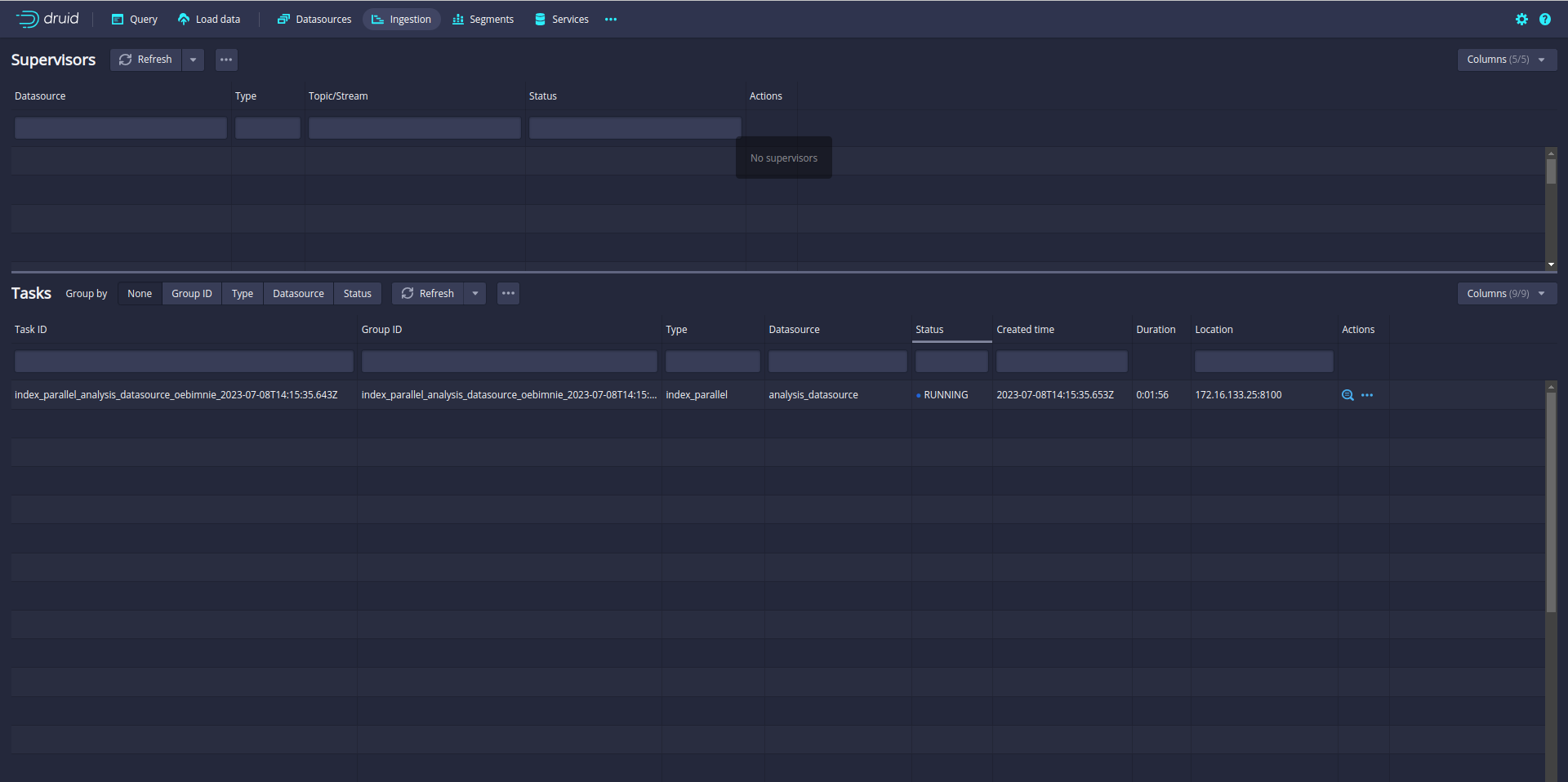
Ingestion is started. You can check the ingestion tab in the Druid UI:

So far so good. But you notice that only one task is running. A single task may take longer time if the data is big. Even your Druid cluster has more slots to run parallel task.

In my case, the Druid cluster has 12 slots. That means Druid can run 12 parallel tasks.

So let’s increase the parallelism from 1 to 12. (default parallelism is 1)

Update the tuningConfig:

"tuningConfig": {
  "type": "index_parallel",
  "maxNumConcurrentSubTasks": 12
}

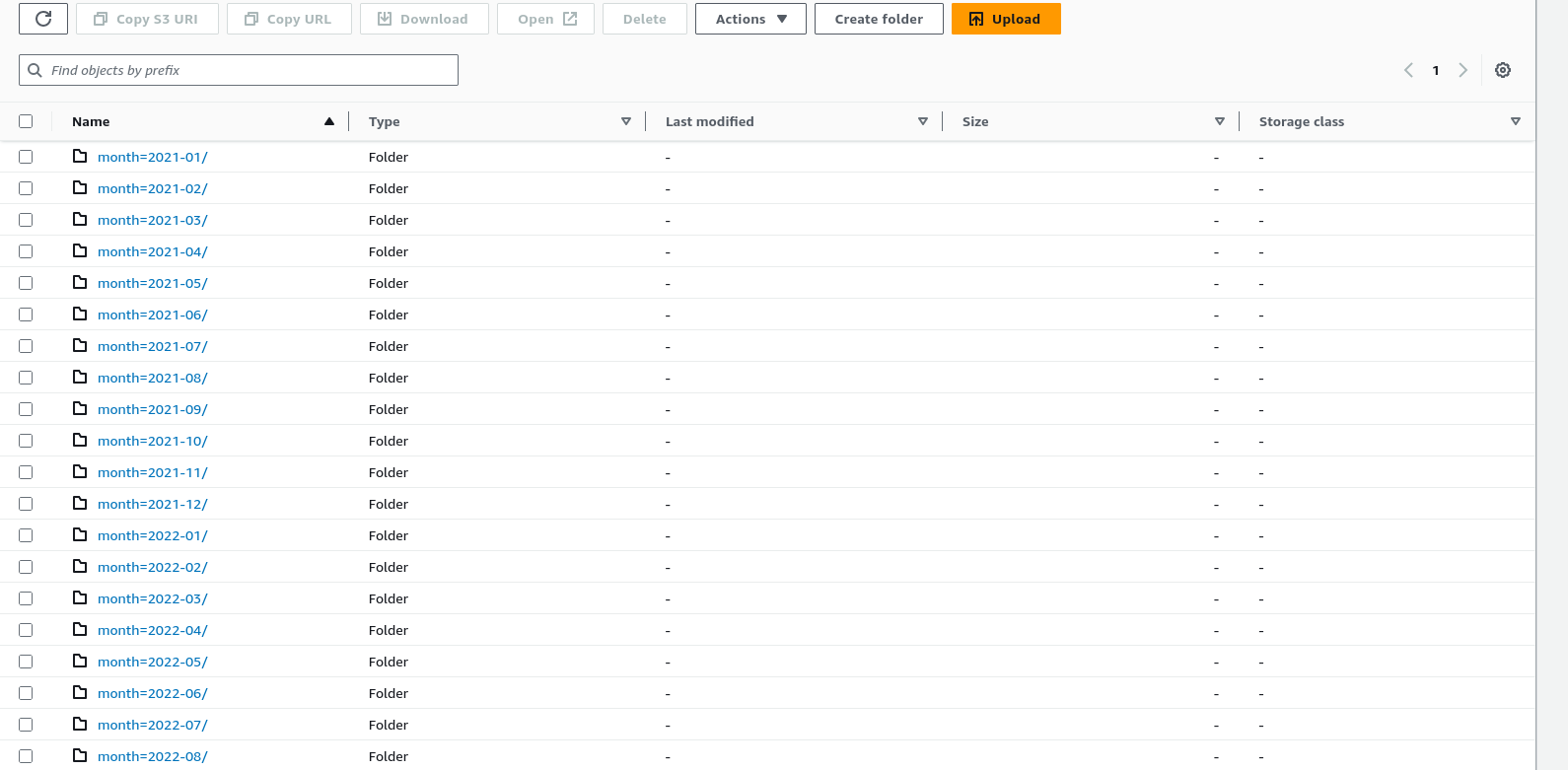
Before starting the ingestion, Make sure your data is partitioned or sorted on the S3 bucket like month, week, and day. In my case data is partitioned by month.

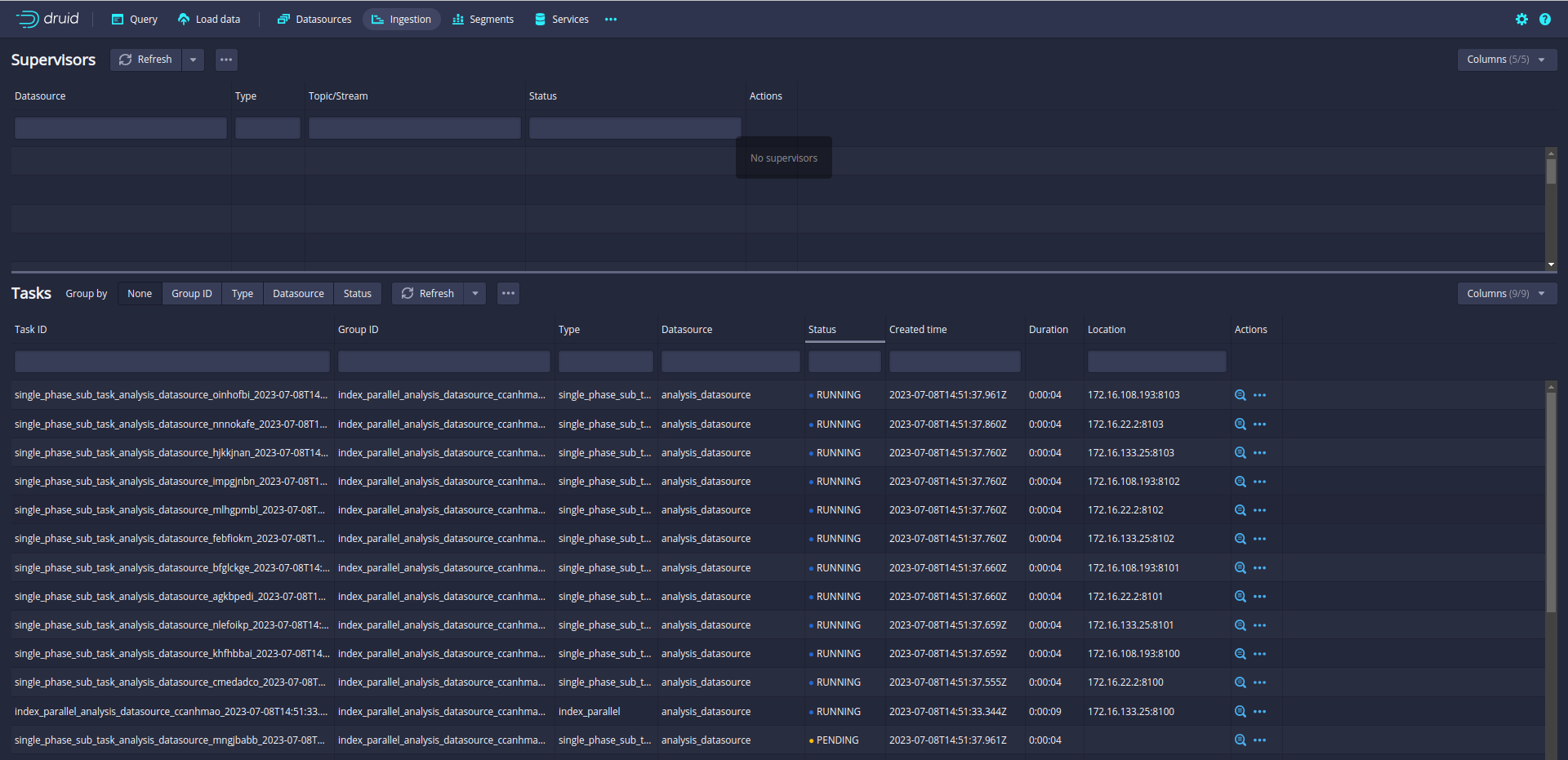
Let’s run again and check the ingestion Tab:

Now, 12 subtasks are running in parallel. Druid will split data loading into multiple subtasks and run the 12 subtasks in parallel.

12 slots are fully utilized!!!

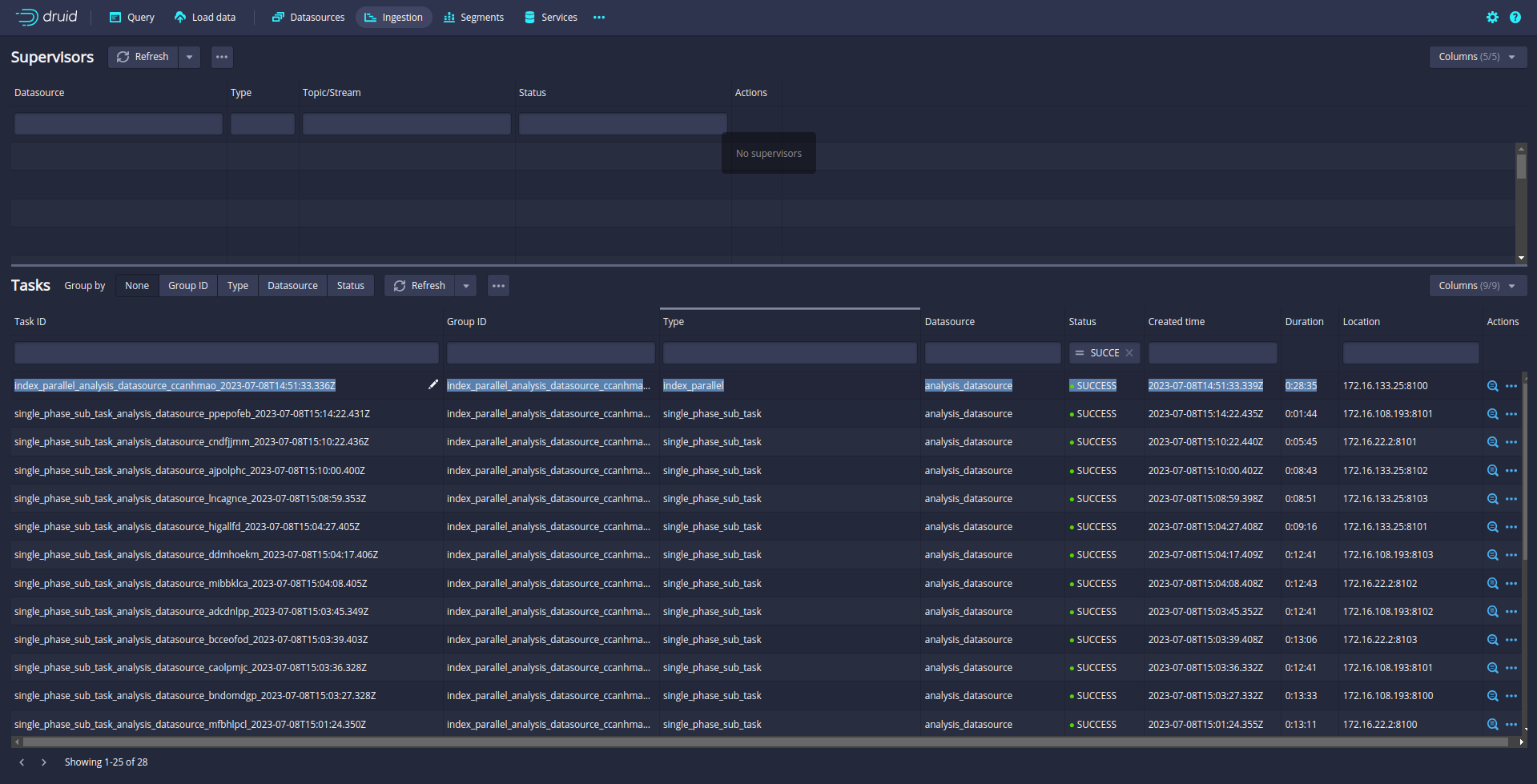
21M Data is loaded into druid in 28 Minutes.

The data is loaded !!!!

Let’s try the query:

References:

https://druid.apache.org/docs/latest/ingestion/index.html

Druid cluster setup on AWS EKS

In this blog, I will describe setting up a druid cluster on AWS EKS.

Prerequisites:

  • EKS Cluster on AWS
  • S3 bucket for deep storage
  • Postgres RDS instance for meta storage

Let’s set up a separate node group on the EKS cluster.

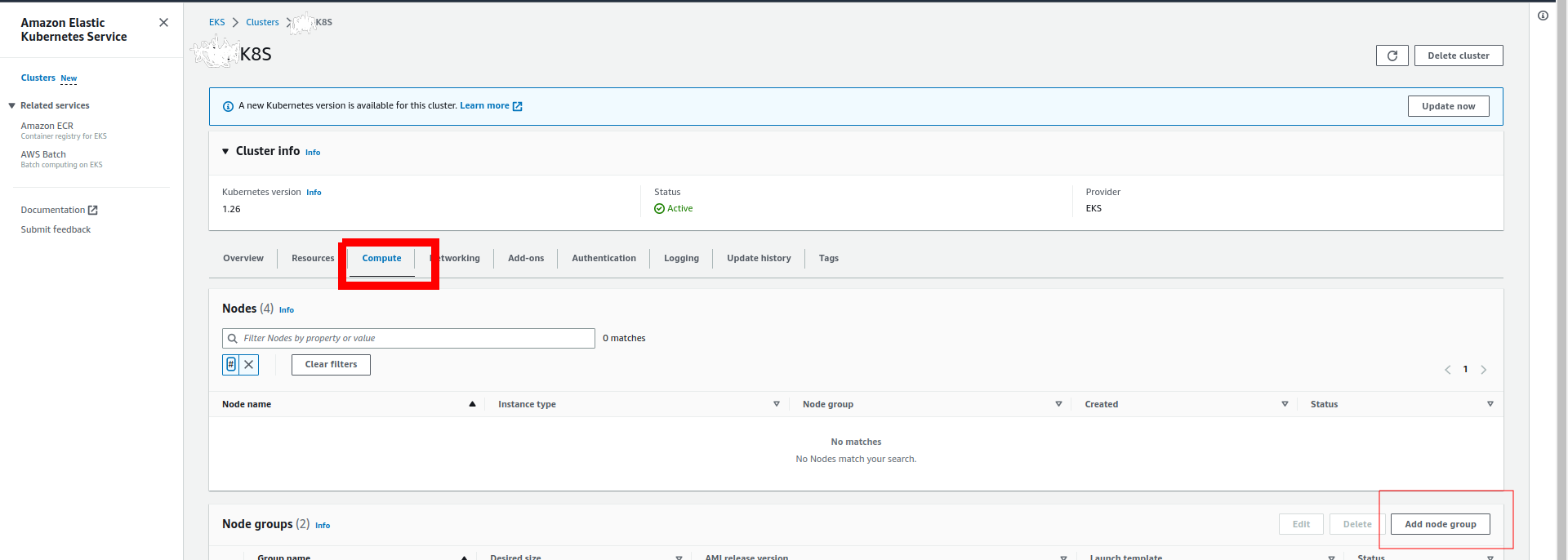
Login into the AWS console and go to Elastic Kubernetes Service. Select the EKS cluster.

Click on compute and then Add Node Group:

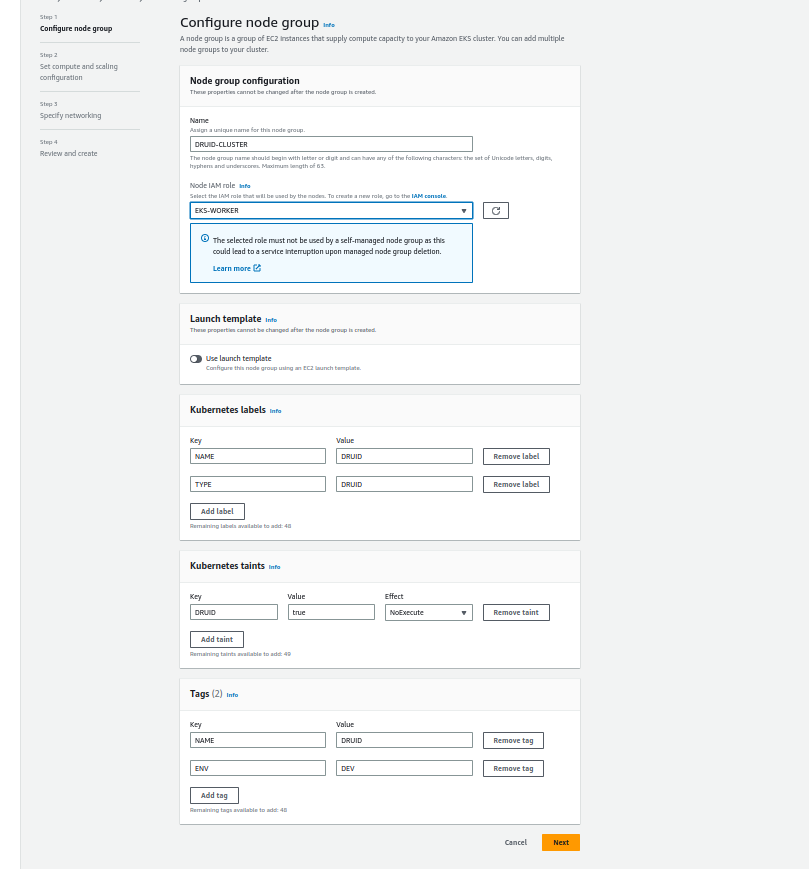
Fill out the node group details:

If you noticed, I used taints for resource isolation so no other pods can run the druid cluster node group.

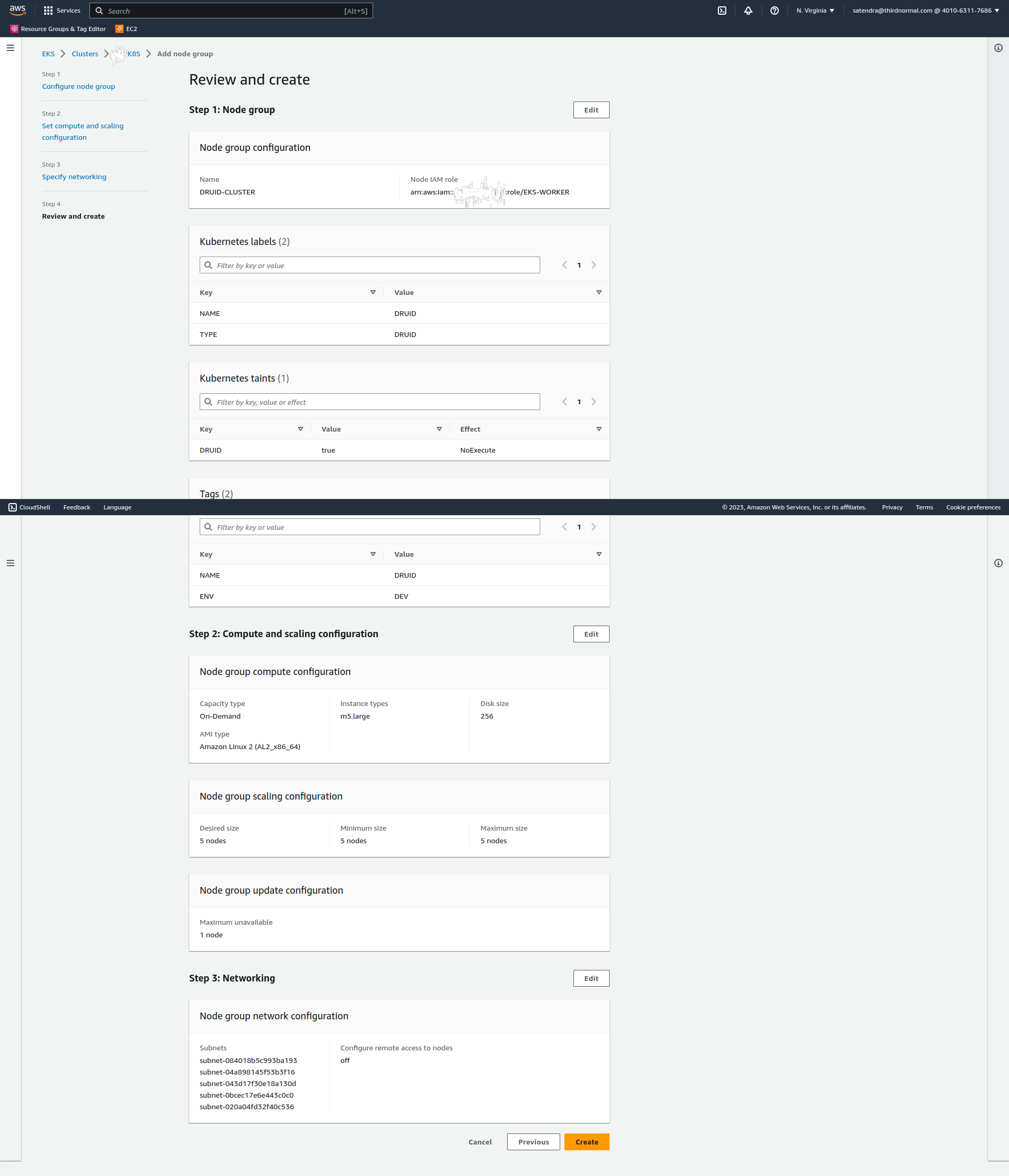
Click on next and add the details of nodes (I am using 5 m5.large nodes and 256 GB disk):

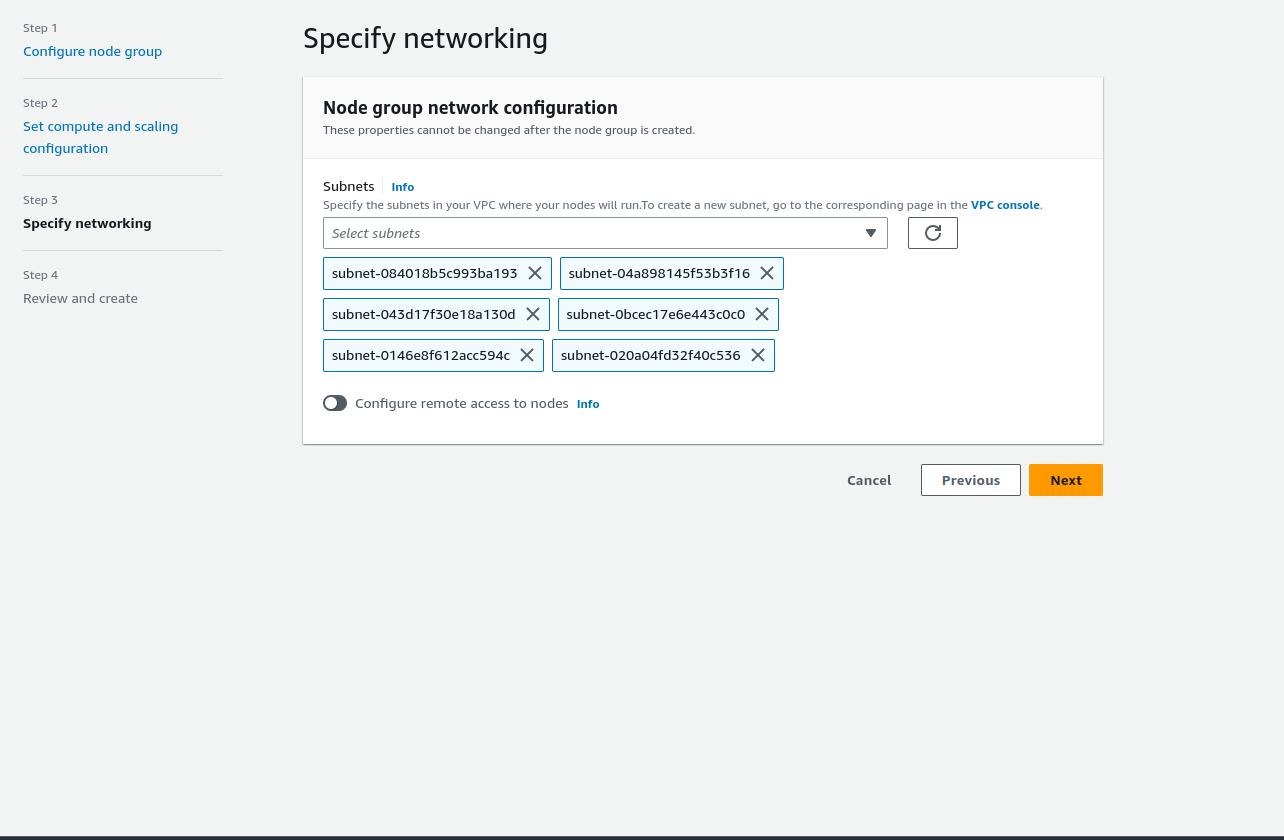
Click on Next and selects the subnets:

Click on next and review the details:

Click on Create.

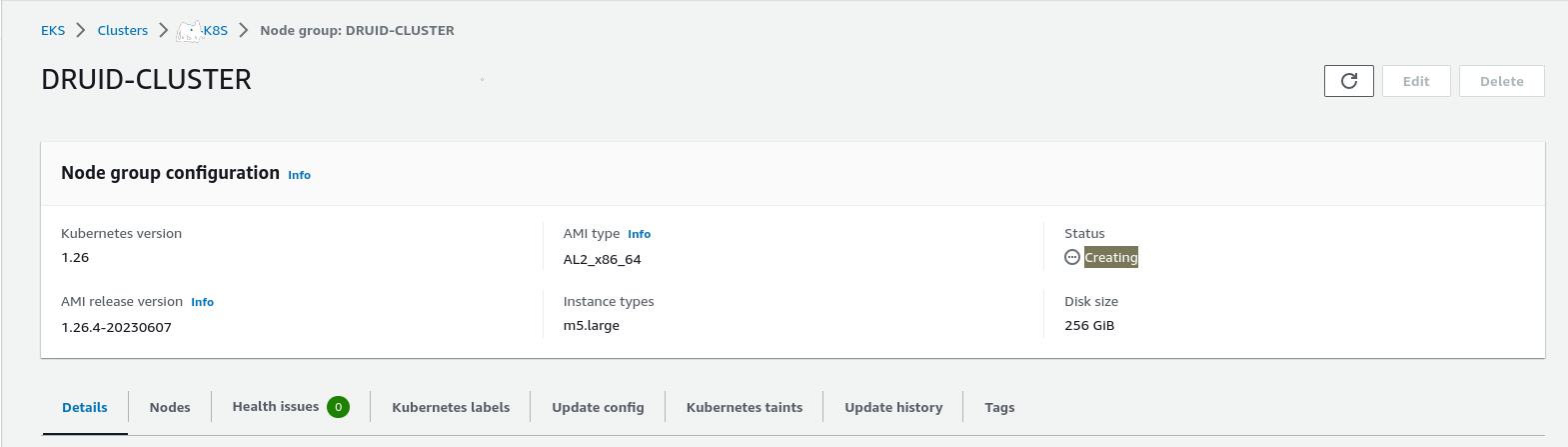
It will take a few seconds to create a node group:

Refresh the page:

The node group is ready.

Let’s validate the nodes:

$ kubectl get nodes -l TYPE=DRUID
NAME STATUS ROLES AGE VERSION
ip-172-31-16-51.ec2.internal Ready 22m v1.26.4-eks-0a21954
ip-172-31-3-242.ec2.internal Ready 22m v1.26.4-eks-0a21954
ip-172-31-35-102.ec2.internal Ready 22m v1.26.4-eks-0a21954
ip-172-31-67-191.ec2.internal Ready 22m v1.26.4-eks-0a21954
ip-172-31-90-74.ec2.internal Ready 22m v1.26.4-eks-0a21954

Create a namespace for the druid cluster:

$ kubect create namespace druid
namespace/druid created

Druid required the zookeeper cluster so first, we need to install the zookeeper cluster. I am using bitnami helm charts to create the zookeeper cluster:

Let’s tweak the zookeeper configuration:

global:
  storageClass: "gp2"
fullnameOverride: "zookeeper"
replicaCount: 3
tolerations:
  - key: "DRUID"
    operator: "Exists"
    effect: "NoExecute"
nodeSelector:
  TYPE: "DRUID"
persistence:
  size: 8Gi
$ helm install zookeeper  -n druid  -f zookeeper/values.yaml   oci://registry-1.docker.io/bitnamicharts/zookeeper 
NAME: zookeeper
LAST DEPLOYED: Sun Jun 18 13:39:20 2023
NAMESPACE: druid
STATUS: deployed
REVISION: 1
TEST SUITE: None
NOTES:
CHART NAME: zookeeper
CHART VERSION: 11.4.2
APP VERSION: 3.8.1

** Please be patient while the chart is being deployed **

ZooKeeper can be accessed via port 2181 on the following DNS name from within your cluster:

    zookeeper.druid.svc.cluster.local

To connect to your ZooKeeper server run the following commands:

    export POD_NAME=$(kubectl get pods --namespace druid -l "app.kubernetes.io/name=zookeeper,app.kubernetes.io/instance=zookeeper,app.kubernetes.io/component=zookeeper" -o jsonpath="{.items[0].metadata.name}")
    kubectl exec -it $POD_NAME -- zkCli.sh

To connect to your ZooKeeper server from outside the cluster execute the following commands:

    kubectl port-forward --namespace druid svc/zookeeper 2181:2181 &
    zkCli.sh 127.0.0.1:2181

Let’s quickly check the zookeeper cluster:

$ kubectl get pods -n druid
NAME READY STATUS RESTARTS AGE
zookeeper-0 1/1 Running 0 4m32s
zookeeper-1 1/1 Running 0 4m32s
zookeeper-2 1/1 Running 0 4m32s

The zookeeper cluster is up and running.

Let’s start on Druid. I am using the Druid operator to install the Druid cluster.

First, install the druid operator using helm(clone the code from here to get the chart):

$ kubectl create namespace druid-operator
namespace/druid-operator created

$ helm -n druid-operator install cluster-druid-operator -f druid-operator/chart/values.yaml  ./druid-operator/chart
NAME: cluster-druid-operator
LAST DEPLOYED: Sun Jun 18 13:52:03 2023
NAMESPACE: druid-operator
STATUS: deployed
REVISION: 1
TEST SUITE: None
NOTES:
Refer to https://github.com/druid-io/druid-operator/blob/master/docs/README.md to get started.

let’s verify the operator pods;

$ kubectl get pods -n druid-operator
NAME READY STATUS RESTARTS AGE
cluster-druid-operator-d68649447-qjmlv 1/1 Running 0 90s

Druid services:

Druid has several types of services:

  • Coordinator service manages data availability on the cluster.
  • Overlord service controls the assignment of data ingestion workloads.
  • Broker handles queries from external clients.
  • Router services are optional; they route requests to Brokers, Coordinators, and Overlords.
  • Historical services store queryable data.
  • MiddleManager services ingest data.

For this deployment, I will deploy Coordinator and Overlord as one service. Here is the config to deploy Coordinator and Overlord as one service:

druid.coordinator.asOverlord.enabled=true

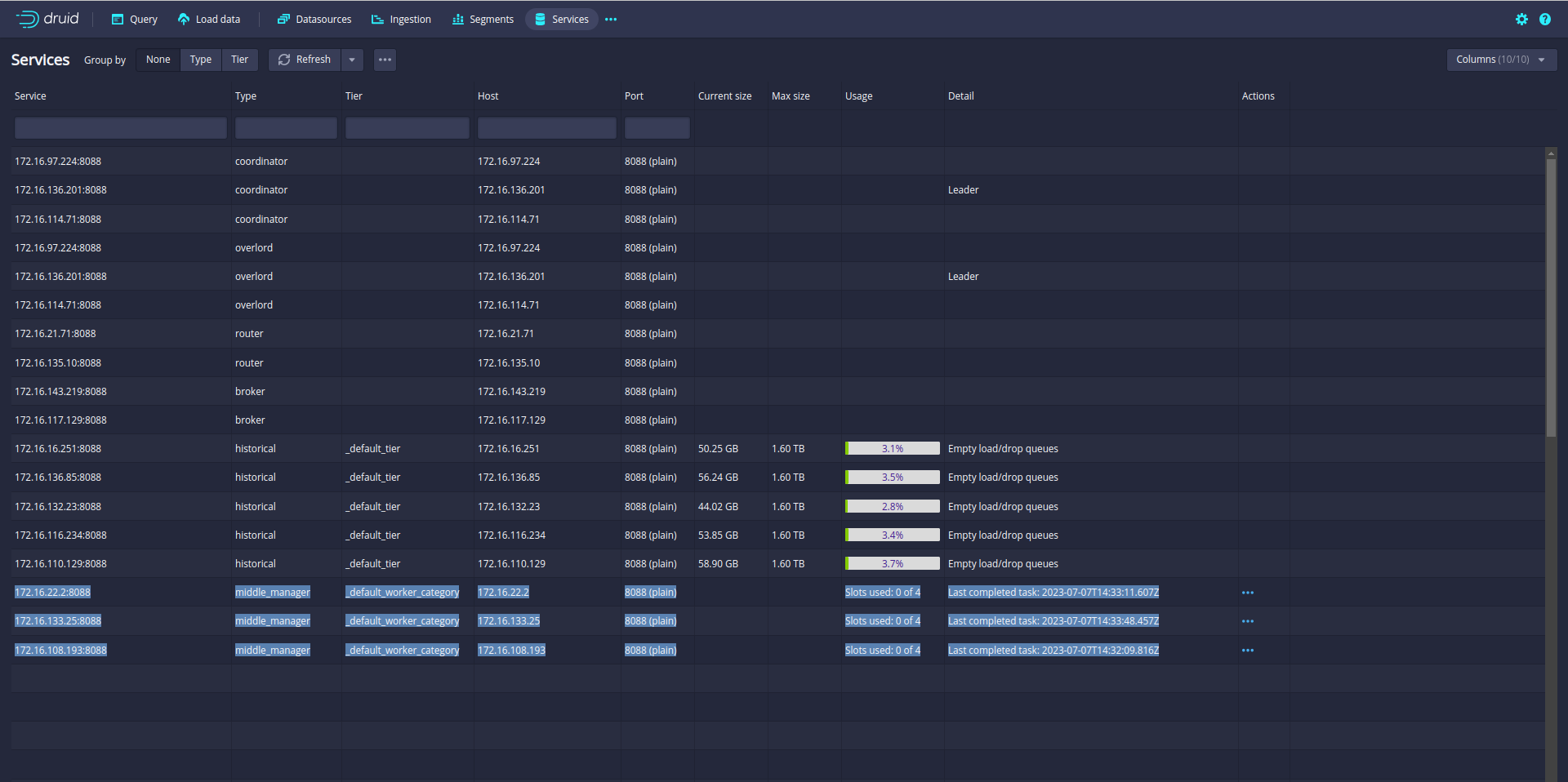
Cluster size: 2 brokers, 2 coordinators/overlords, 3 historicals, 3 middlemanagers and 2 routers.

Configured all these services into a file:

dev-cluster.yaml

apiVersion: "druid.apache.org/v1alpha1"
kind: "Druid"
metadata:
  name: cluster
spec:
  image: apache/druid:25.0.0
  startScript: /druid.sh
  podLabels:
    environment: DEV
    NAME: DRUID
  podAnnotations:
    NAME: DRUID
  readinessProbe:
    httpGet:
      path: /status/health
      port: 8088
  securityContext:
    fsGroup: 1000
    runAsUser: 1000
    runAsGroup: 1000
  services:
    - spec:
        type: ClusterIP
        clusterIP: None
  tolerations:
    - key: "DRUID"
      operator: "Exists"
      effect: "NoExecute"
  nodeSelector:
    TYPE: "DRUID"
  commonConfigMountPath: "/opt/druid/conf/druid/cluster/_common"
  jvm.options: |-
    -server
    -Duser.timezone=UTC
    -Dfile.encoding=UTF-8
    -Djava.util.logging.manager=org.apache.logging.log4j.jul.LogManager
    -Djava.io.tmpdir=/druid/data
  log4j.config: |-
    <?xml version="1.0" encoding="UTF-8" ?>
    <Configuration status="INFO">
      <Properties>
        <Property name="druid.log.path" value="log" />
      </Properties>
      <Appenders>
        <Console name="Console" target="SYSTEM_OUT">
          <PatternLayout pattern="%d{ISO8601} %p [%t] %c - %m%n"/>
        </Console>
        <!-- Rolling Files-->
        <RollingRandomAccessFile name="FileAppender" fileName="${env:DRUID_LOG_DIR}/${env:DRUID_NODE_TYPE}.log" filePattern="${env:DRUID_LOG_DIR}/${env:DRUID_NODE_TYPE}.%d{yyyyMMdd}.log">
          <PatternLayout pattern="%d{ISO8601} %p [%t] %c - %m%n"/>
          <Policies>
          <TimeBasedTriggeringPolicy interval="1" modulate="true"/>
          </Policies>
          <DefaultRolloverStrategy>
          <Delete basePath="${env:DRUID_LOG_DIR}/" maxDepth="1">
          <IfFileName glob="*.log" />
          <IfLastModified age="30d" />
          </Delete>
          </DefaultRolloverStrategy>
        </RollingRandomAccessFile>
      </Appenders>
      <Loggers>
        <Root level="info">
          <AppenderRef ref="FileAppender"/>
        </Root>
        <!-- Set level="debug" to see stack traces for query errors -->
        <Logger name="org.apache.druid.server.QueryResource" level="info" additivity="false">
          <Appender-ref ref="FileAppender"/>
        </Logger>
        <Logger name="org.apache.druid.server.QueryLifecycle" level="info" additivity="false">
          <Appender-ref ref="FileAppender"/>
        </Logger>
        <Logger name="org.apache.druid.server.coordinator" level="info" additivity="false">
         <Appender-ref ref="FileAppender"/>
        </Logger>
        <Logger name="org.apache.druid.segment" level="info" additivity="false">
          <Appender-ref ref="FileAppender"/>
        </Logger>
        <Logger name="org.apache.druid.initialization" level="info" additivity="false">
          <Appender-ref ref="FileAppender"/>
        </Logger>
        <Logger name="org.skife.config" level="info" additivity="false">
          <Appender-ref ref="FileAppender"/>
        </Logger>
        <Logger name="com.sun.jersey.guice" level="info" additivity="false">
          <Appender-ref ref="FileAppender"/>
        </Logger>
      </Loggers>
    </Configuration>
  common.runtime.properties: |
    # Zookeeper
    druid.zk.service.host=zookeeper.druid
    druid.zk.paths.base=/druid
    druid.zk.service.compress=false
    # Metadata Store
    druid.metadata.storage.type=postgresql
    druid.metadata.storage.connector.connectURI=jdbc:postgresql://xxxxxxxxus-east-1.rds.amazonaws.com:5432/druid_meta_db
    druid.metadata.storage.connector.host=xxxxxxxxus-east-1.rds.amazonaws.com
    druid.metadata.storage.connector.port=5432
    druid.metadata.storage.connector.createTables=true
    druid.metadata.storage.connector.user=postgres
    druid.metadata.storage.connector.password=******************************
    # Deep Storage
    druid.storage.type=s3
    druid.storage.bucket=s3_bucket_name
    druid.storage.baseKey=data
    druid.storage.archiveBaseKey=archive
    druid.storage.disableAcl=true
    druid.s3.accessKey=*********************
    druid.s3.secretKey=************************
    #
    # Extensions
    #
    druid.extensions.loadList=["druid-kafka-indexing-service", "druid-s3-extensions", "postgresql-metadata-storage"]
    #
    # Service discovery
    #
    druid.selectors.indexing.serviceName=druid/overlord
    druid.selectors.coordinator.serviceName=druid/coordinator
    druid.indexer.logs.type=file
    druid.indexer.logs.directory=/druid/data/indexing-logs
    druid.lookup.enableLookupSyncOnStartup=false
  volumeMounts:
    - mountPath: /druid/data
      name: data-volume
    - mountPath: /druid/deepstorage
      name: deepstorage-volume
  volumes:
    - name: data-volume
      emptyDir:
        sizeLimit: 126Gi
    - name: deepstorage-volume
      hostPath:
        path: /tmp/druid/deepstorage
        type: DirectoryOrCreate
  env:
    - name: POD_NAME
      valueFrom:
        fieldRef:
          fieldPath: metadata.name
    - name: POD_NAMESPACE
      valueFrom:
        fieldRef:
          fieldPath: metadata.namespace

  nodes:
    brokers:
      nodeType: "broker"
      druid.port: 8088
      replicas: 2
      tolerations:
        - key: "DRUID"
          operator: "Exists"
          effect: "NoExecute"
      nodeSelector:
        TYPE: "DRUID"
      env:
        - name: DRUID_LOG_DIR
          value: /druid/data/log
        - name:  DRUID_NODE_TYPE
          value: broker
        - name: DRUID_XMS
          value: 2g
        - name: DRUID_XMX
          value: 2g
        - name: DRUID_MAXDIRECTMEMORYSIZE
          value: 2g
      resources:
        limits:
          cpu: 500m
          memory: 2Gi
        requests:
          cpu: 500m
          memory: 2Gi
      nodeConfigMountPath: "/opt/druid/conf/druid/cluster/query/broker"
      runtime.properties: |
        druid.service=druid/broker
        druid.broker.http.numConnections=10
        druid.server.http.numThreads=20
        druid.processing.buffer.sizeBytes=56843545
        druid.processing.numMergeBuffers=2
        druid.processing.numThreads=10
        druid.sql.enable=true

    coordinators:
      nodeType: "coordinator"
      druid.port: 8088
      nodeConfigMountPath: "/opt/druid/conf/druid/cluster/master/coordinator-overlord"
      replicas: 2
      tolerations:
        - key: "DRUID"
          operator: "Exists"
          effect: "NoExecute"
      nodeSelector:
        TYPE: "DRUID"
      resources:
        limits:
          cpu: 500m
          memory: 1Gi
        requests:
          cpu: 500m
          memory: 1Gi
      env:
        - name: DRUID_LOG_DIR
          value: /druid/data/log
        - name:  DRUID_NODE_TYPE
          value: coordinator
        - name: DRUID_XMS
          value: 1g
        - name: DRUID_XMX
          value: 1g
        - name: DRUID_MAXDIRECTMEMORYSIZE
          value: 1g

      runtime.properties: |
        druid.service=druid/coordinator
        druid.coordinator.asOverlord.enabled=true
        druid.coordinator.asOverlord.overlordService=druid/overlord
        druid.indexer.runner.type=httpRemote
        druid.indexer.queue.startDelay=PT5S
        druid.coordinator.balancer.strategy=cachingCost
        druid.serverview.type=http
        druid.indexer.storage.type=metadata
        druid.coordinator.startDelay=PT10S
        druid.coordinator.period=PT5S
        druid.server.http.numThreads=50

    historicals:
      nodeType: historical
      druid.port: 8088
      nodeConfigMountPath: "/opt/druid/conf/druid/cluster/data/historical"
      replicas: 3
      tolerations:
        - key: "DRUID"
          operator: "Exists"
          effect: "NoExecute"
      nodeSelector:
        TYPE: "DRUID"
      resources:
        limits:
          cpu: 1
          memory: 2Gi
        requests:
          cpu: 1
          memory: 2Gi
      env:
        - name: DRUID_LOG_DIR
          value: /druid/data/log
        - name: DRUID_NODE_TYPE
          value: historical
        - name: DRUID_XMS
          value: 2g
        - name: DRUID_XMX
          value: 2g
        - name: DRUID_MAXDIRECTMEMORYSIZE
          value: 2g
      runtime.properties: |
        druid.service=druid/historical
        druid.server.http.numThreads=10
        druid.processing.buffer.sizeBytes=50MiB
        druid.processing.numMergeBuffers=2
        druid.processing.numThreads=15
        druid.cache.sizeInBytes=25MiB
        # Segment storage
        druid.segmentCache.locations=[{\"path\":\"/druid/data/segments\",\"maxSize\":157374182400}]
        druid.server.maxSize=157374182400

    middlemanagers:
      druid.port: 8088
      nodeType: middleManager
      nodeConfigMountPath: "/opt/druid/conf/druid/cluster/data/middleManager"
      replicas: 3
      tolerations:
        - key: "DRUID"
          operator: "Exists"
          effect: "NoExecute"
      nodeSelector:
        TYPE: "DRUID"
      resources:
        limits:
          cpu: 500m
          memory: 2Gi
        requests:
          cpu: 500m
          memory: 2Gi
      env:
        - name: DRUID_LOG_DIR
          value: /druid/data/log
        - name: DRUID_NODE_TYPE
          value: middleManager
        - name: DRUID_XMX
          value: 2g
        - name: DRUID_XMS
          value: 2g
      runtime.properties: |
        druid.service=druid/middleManager
        druid.worker.capacity=2
        druid.indexer.runner.javaOpts=-server -Xms1g -Xmx1g -XX:MaxDirectMemorySize=1g -Duser.timezone=UTC -Dfile.encoding=UTF-8 -XX:+ExitOnOutOfMemoryError -Djava.util.logging.manager=org.apache.logging.log4j.jul.LogManager
        druid.indexer.task.baseTaskDir=var/druid/task
        # HTTP server threads
        druid.server.http.numThreads=50
        # Processing threads and buffers on Peons
        druid.indexer.fork.property.druid.processing.numMergeBuffers=1
        druid.indexer.fork.property.druid.processing.buffer.sizeBytes=32000000
        druid.indexer.fork.property.druid.processing.numThreads=2

    routers:
      nodeType: "router"
      druid.port: 8088
      nodeConfigMountPath: "/opt/druid/conf/druid/cluster/query/router"
      replicas: 2
      tolerations:
        - key: "DRUID"
          operator: "Exists"
          effect: "NoExecute"
      nodeSelector:
        TYPE: "DRUID"
      env:
        - name: DRUID_LOG_DIR
          value: /druid/data/log
        - name: DRUID_NODE_TYPE
          value: router
        - name: DRUID_XMX
          value: 1g
        - name: DRUID_XMS
          value: 1g
      resources:
        limits:
          cpu: 250m
          memory: 1Gi
        requests:
          cpu: 250m
          memory: 1Gi
      runtime.properties: |
        druid.service=druid/router
        druid.router.http.numConnections=500
        druid.router.http.readTimeout=PT5M
        druid.router.http.numMaxThreads=1000
        druid.server.http.numThreads=500
        druid.processing.buffer.sizeBytes=500MiB
        druid.processing.numMergeBuffers=6
        # Service discovery
        druid.router.defaultBrokerServiceName=druid/broker
        druid.router.coordinatorServiceName=druid/coordinator
        # Management proxy to coordinator / overlord: required for unified web console.
        druid.router.managementProxy.enabled=true
      services:
        -  spec:
            ports:
              - name: router-port
                port: 8088
            type: ClusterIP

$ kubectl apply -f druid-cluster/dev-cluster.yaml -n druid
druid.druid.apache.org/cluster created

Let’s check all the pods:

$ kubectl get pods -n druid
NAME READY STATUS RESTARTS AGE
druid-cluster-brokers-0 1/1 Running 0 114s
druid-cluster-brokers-1 1/1 Running 0 114s
druid-cluster-brokers-2 0/1 Pending 0 114s
druid-cluster-coordinators-0 1/1 Running 0 114s
druid-cluster-coordinators-1 0/1 Pending 0 114s
druid-cluster-historicals-0 1/1 Running 0 114s
druid-cluster-historicals-1 1/1 Running 0 114s
druid-cluster-historicals-2 0/1 Pending 0 114s
druid-cluster-middlemanagers-0 1/1 Running 0 114s
druid-cluster-middlemanagers-1 1/1 Running 0 114s
druid-cluster-middlemanagers-2 1/1 Running 0 114s
druid-cluster-routers-0 1/1 Running 0 114s
druid-cluster-routers-1 1/1 Running 0 114s
druid-cluster-routers-2 1/1 Running 0 114s
zookeeper-0 1/1 Running 0 48m
zookeeper-1 1/1 Running 0 48m
zookeeper-2 1/1 Running 0 48m

Some of the pods are pending. wait for a few seconds and try again:

$ kubectl get pods -n druid
NAME READY STATUS RESTARTS AGE
druid-cluster-brokers-0 1/1 Running 0 10m
druid-cluster-brokers-1 0/1 Running 0 94s
druid-cluster-coordinators-0 0/1 Running 0 32s
druid-cluster-coordinators-1 1/1 Running 0 74s
druid-cluster-historicals-0 1/1 Running 0 72s
druid-cluster-historicals-1 1/1 Running 0 2m16s
druid-cluster-historicals-2 1/1 Running 0 3m19s
druid-cluster-middlemanagers-0 1/1 Running 0 10m
druid-cluster-middlemanagers-1 1/1 Running 0 10m
druid-cluster-middlemanagers-2 1/1 Running 0 10m
druid-cluster-routers-0 1/1 Running 0 10m
druid-cluster-routers-1 1/1 Running 0 10m
zookeeper-0 1/1 Running 0 56m
zookeeper-1 1/1 Running 0 56m
zookeeper-2 1/1 Running 0 56m

Now all processes are up and running.

Let’s connect to the druid console using port forwarding:

$ kubectl port-forward service/druid-cluster-routers -n druid 8088:8088

open the browser and connect to http://localhost:8088

Wow! Druid cluster is running on EKS!!!!

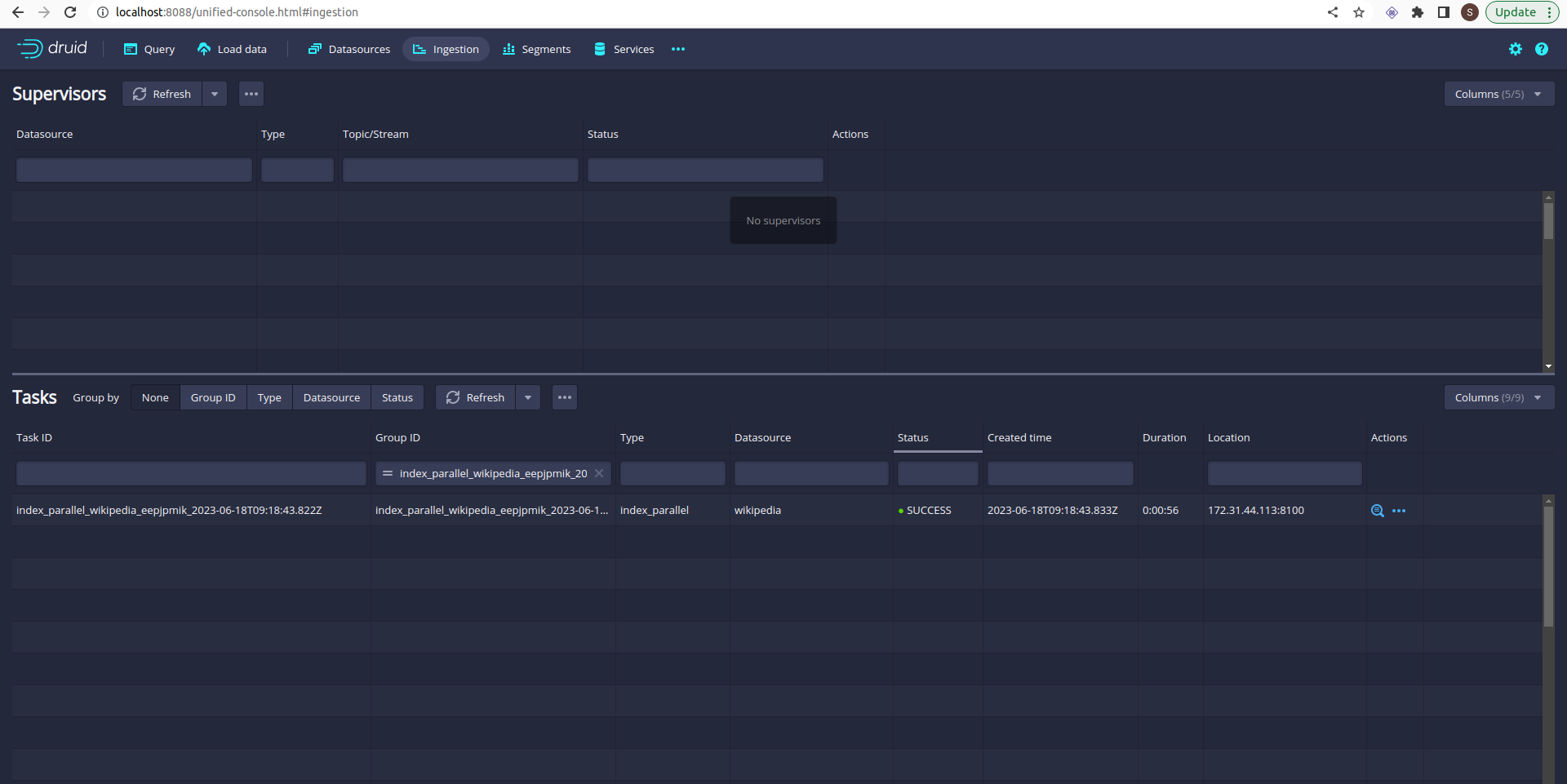
Let’s try to load data on Druid:

Click on the load data tab and select the example data:

Select all the default settings and you will reach on submit page:

click on submit and wait for a few seconds:

Refresh it:

Data is loaded.

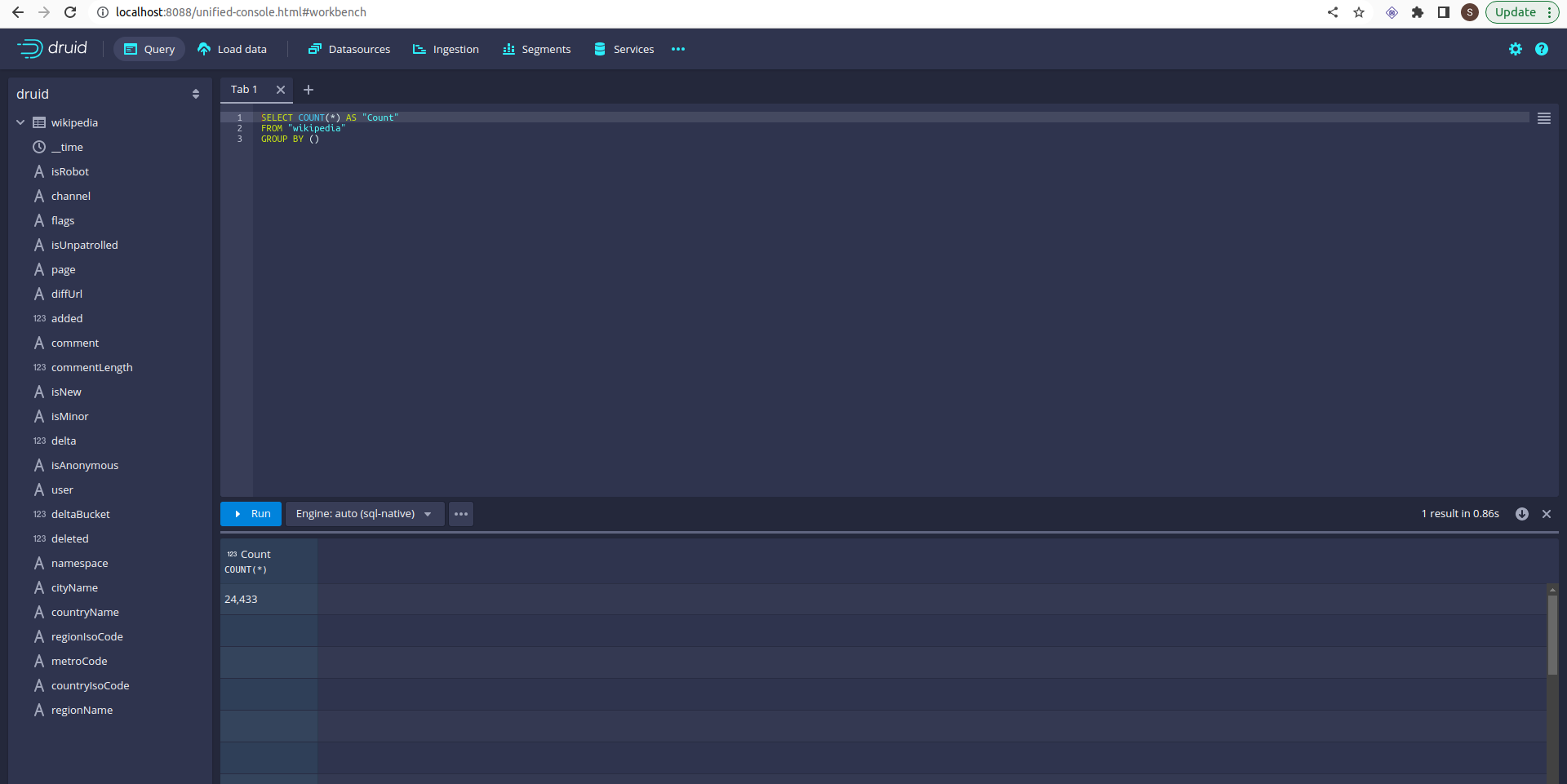
Let’s do some queries:

Click on the query table:

Select count query and click on run:

You can see the query results!!!.

References:

  1. Druid
  2. Druid-operator
  3. Zookeeper